
Run a regulated store that’s always ready for the audit.
Licensing, inventory controls, SOPs, and the incident log a regulator will ask for — read once, then kept connected in one workspace, so a compliance check is something you open, not something you scramble to assemble overnight.
Clarity you can hand to an inspector.
One hub covers the four things that keep a regulated store legible. You walk away able to see it, staff it, and prove it on demand.
Numbers you trust
Regulated inventory, restricted-product counts, and what moved connect to the vendor and the SKU they belong to. What’s on hand, what sold, and what each category earned roll up automatically — so the controlled side of the store is something you read, not reconstruct under an auditor’s deadline.
Inventory controlsA store your team can read
Every license shows its renewal date. Every SOP shows who’s trained on it. Today’s compliance tasks, which permit is due, who can legally work the counter — surfaced in shared views a manager or new hire can open without routing through you.
Operational transparencyKnowledge that stays when people leave
Standard operating procedures, training records, incident reports, and the documented version of how each regulated sale is handled live attached to the license, SKU, or staff member they belong to. The compliance knowledge currently in your head begins compounding as structured, searchable information.
Knowledge managementA foundation built for AI
AI tools can only help you when your data is structured and relational — not buried in a filing drawer and a binder of SOPs. The Retail Ops Hub is that foundation. The system gets more capable with every license, SKU, and incident you put into it.
AI buildingA store only you can keep compliant can’t grow, can’t be staffed, and is one missed date from a shutdown.
Every month it runs on your memory, the same tax compounds. A license lapses because the renewal date lived in your head, and the doors close until it’s reinstated. A new hire sells a restricted product wrong because the SOP was never written down, and the violation lands on your record. An incident goes unlogged and becomes the gap an auditor finds. A regulator walks in and the documentation takes three days to assemble. Each one is structural — what happens when a regulated operation runs without a real system — and in this category each one carries fines, suspension, or the license itself.
Get the Retail Ops Hub — $99The home view of your store.
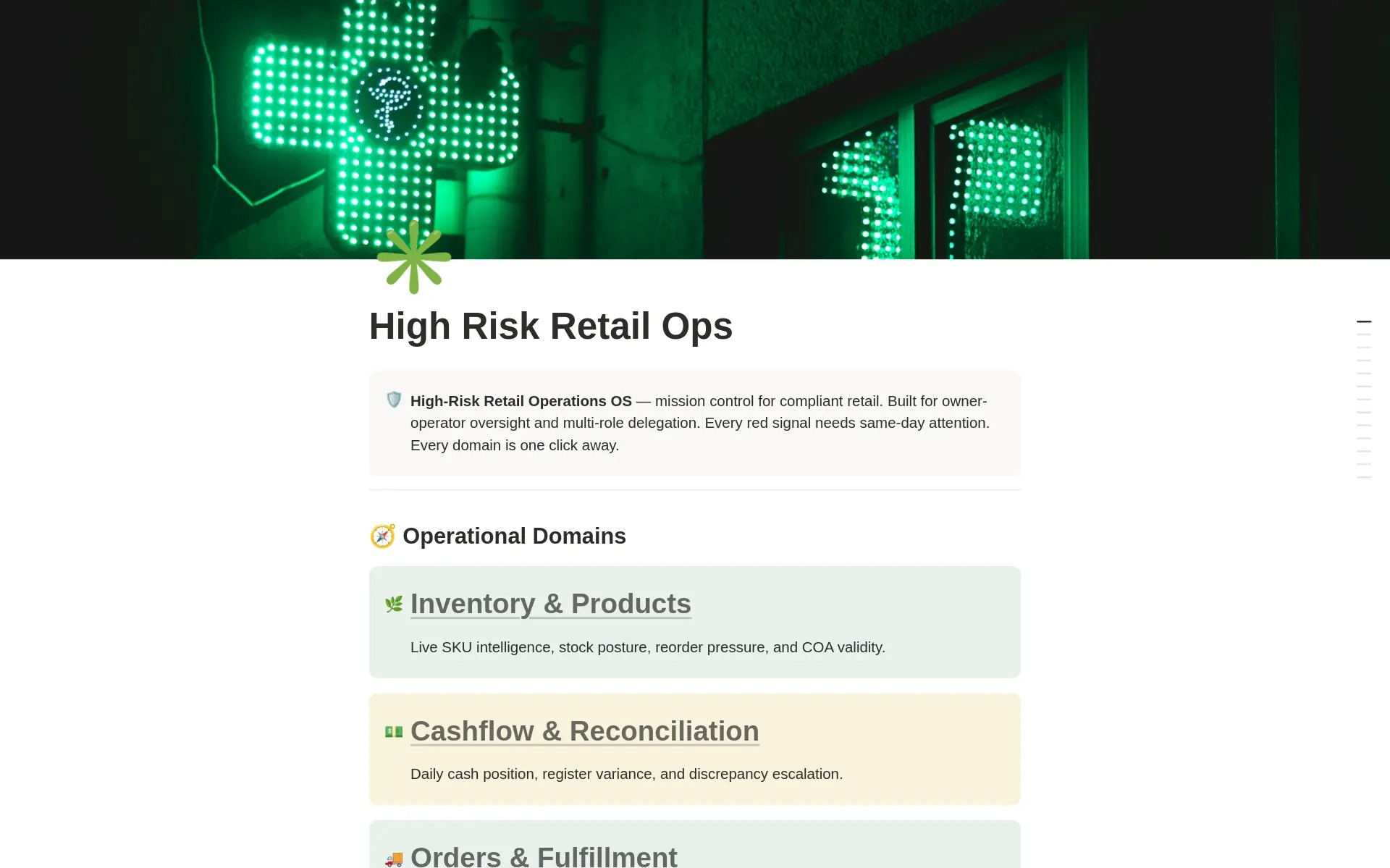
Twelve operational domains. One connected databasement.
Every record lives once, inside a shared workspace. Each domain below is a dashboard that pulls live views from it, so a new incident, a renewed license, or a failed COA reflects everywhere the store reads from.
Inventory & Products
Live SKU intelligence, stock posture, reorder pressure, and COA validity.
Cashflow & Reconciliation
Daily cash position, register variance, and discrepancy escalation.
Orders & Fulfillment
Live order pipeline — cart to customer hand, every channel.
Compliance & Documentation
The line between operating and shutdown — deadlines, audits, certifications.
Staff Operations
Roster, schedule, performance, coverage gaps, and training pipeline.
Security & Incidents
Floor, vault, parking lot — every log, every alarm, every escalation.
Vendors & Suppliers
Supply chain reliability, compliance posture, and PO pipeline.
Marketing & Promotions
Campaign pipeline, redemption tracking, revenue lift.
Product Testing & COAs
Certificate validity, panel pass rates, regulatory readiness.
Store Operations
Daily checklists, floor activity, maintenance, cash posture.
Risk Monitoring
Operational early-warning system — every risk owned, mitigated, reviewed.
Customer Loyalty
Lifetime value, tier management, reactivation campaigns.
All twelve domains share the same connected databasement, so a new incident, a renewed license, or a failed COA reflects everywhere the store reads from.
The read comes first. The build follows the diagnosis.
A system installed over an unread operation just adds another place to look. The Retail Ops Hub was built from reading how regulated stores actually run — so the structure answers the problems the read names.
Diagnosis before architecture
The sections, connections, and roll-ups were shaped by following real regulated stores end to end — reading where a renewal slipped, where an SOP existed only in the owner’s head, and where an audit turned into a multi-day scramble. The architecture answers what the read found, so you build the right thing first.
One hub for the whole store
Compliance and licensing, inventory controls, vendors, SOPs and training, the incident and loss log, and audit prep — held in one connected workspace where a license carries its renewal date, an SOP carries who’s trained on it, and an incident carries the record an auditor will ask for. Everyone opens the same hub and sees the right view for their role.
Built to outlast you
The template ships with the structure a regulated store actually uses — a proven starting point. You might run CBD, vape, alcohol, or firearms across one to five locations. Every database, status, and view is yours to retool to your category’s rules, and the structure keeps fitting as you add locations.
What Notion is — and why this lives there.
You don’t need to know Notion before you start. Here’s what matters: it’s a workspace tool where the same information can look like a table, a board, a calendar, or a dashboard depending on who’s looking. One workspace, the right view for every job.
Picture a document that also behaves like a relational database. You open the compliance dashboard each morning. A manager opens the daily SOP checklist. You open the audit-prep view when the regulator schedules a visit. Same data, no double-entry, no one working from a different version.
Notion is flexible enough to hold licensing, inventory controls, vendors, SOPs, incidents, and audit prep in one workspace — without a per-seat compliance subscription. Nothing else wires a license to its renewal, an SOP to its trained staff, and an incident to its record in one connected place.
Gentler than the compliance software you’ve already abandoned once. Notion works like documents and tables you already know. The setup guide walks you through the first week. Most operators are running their compliance calendar from it within days of duplicating the template.
AI tools can read and act on structured, relational databases in ways they can’t touch a filing drawer or a binder. Every license, SOP, and incident you add becomes queryable — building infrastructure that compounds, rather than getting organized once and forgotten.
A hub built from reading the operation, not guessing at it.
The structure came from sitting with regulated stores and following the work — the sale, the restock, the renewal, the audit — end to end. Here is what that produced.
Licenses surface by deadline
Every permit, license, and certification carries its renewal date, so the layer where a missed date closes the doors reports itself in advance instead of arriving as a notice.
SOPs carry their trained staff
Each procedure shows who’s been trained on it and when, so a restricted sale is handled the documented way by someone qualified to handle it — not improvised by whoever’s on shift.
Incidents become the audit record
Every incident, loss, and corrective action is logged where it stays, so audit prep is opening a view instead of assembling a paper trail the night before the inspector arrives.

The whole store audit-ready. From $99.
I’m Jacob Sager. I build operating systems for owner-led businesses on Notion. The Retail Ops Hub is the self-install version of what I build for regulated stores — the same structure, ready to duplicate and run.
Get the Retail Ops Hub — $99Start where you are. Move up when you’re ready.
Run it yourself, have it read and tuned to your store, or have the whole thing built and diagnosed with you.
- All six connected sections
- Compliance, SOP, and audit-prep views prebuilt
- Setup guide for your first week
- Free updates to the template
- Everything in The Template
- Installed and set up with your licenses and SOPs
- Business Nervous System read of the operation
- Primary constraint named, with what to do about it
- Working session to walk it through
- Everything in Guided Start
- Licenses, SOPs, and records brought current and loaded
- Full Foundation report, three structural moves documented
- Compliance calendar built out — in a regulated store, it works hard
- Ongoing support available after
Run a real week through it first.
If The Template isn’t earning its place within 30 days, email us and we’ll refund it. Run a real week of compliance tasks and log a real incident through the hub before you decide.
Three steps to a store that reports its own state.
Duplicate it in
One click brings all six sections, every connected database, and every view into your Notion account with structure intact. A free Notion plan works fine.
Load licenses, SOPs, and renewals first
Clear the sample records and enter the store — every license, every procedure, every expiration date. Those are the facts with consequences. The inventory and incident logs fill from there.
Run from it
Work the compliance dashboard each morning. Log incidents the day they happen. Check the renewals view weekly. The hub does the remembering, so the audit is never a surprise.
Most regulated stores don’t fail on the selling. They stall on the owner — the one person who knows what’s licensed, what’s due, and how every rule gets followed.
The store grew because you knew the category cold — the rules, the vendors, the way a restricted sale has to be handled. For a while, holding all of that in your head was the cheapest way to stay compliant. Then you added a location, hired a counter team, and the thing that made it work early became the thing that put the license at risk every time you weren’t in the building.
The Retail Ops Hub exists to take the compliance off your memory and put it somewhere it can be read, trained, and proven. Not a heavier process — a clearer one. The structure carries the parts that protect the license, so your attention goes to running the store.
Or get it for free.
High Risk Retail Ops is also on the Notion Marketplace, free to duplicate. No support, no setup help — just the template.
Get it on Notion Marketplace →Run a store that’s always ready.
Get the hub and duplicate it today.
Get the Retail Ops Hub — $9930-day money-back guarantee on The Template.
Want to talk it through first?
Walk the workspace with the person who built it. Bring your questions to Jacob and get a straight read on whether the Retail Ops Hub fits your store.
Ask Jacob →